

Undivided’s IEP Assistant: Common Parent Questions
Undivided’s IEP Assistant is an innovative tool designed to help parents review key information in their child’s IEP and prepare for more productive conversations with the school. We sat down with CEO Seth Besse to learn how the IEP Assistant works and see how game-changing tools can make a difference for our IEP prep.
Check out this demo of what to expect from Undivided’s IEP Assistant, including new updates as of fall 2026:
IEP Assistant FAQ
Here are Besse’s answers to some common parent questions about using Undivided’s IEP Assistant:
How does Undivided’s IEP Assistant work?
Once you’ve uploaded your IEP document, IEP Assistant extracts all of the information from the IEP and goes through step by step to identify the different sections of an IEP based on AI training and large language models. There’s no standardized IEP format across the country, so the IEP Assistant identifies where to find the goals, services, accommodations, etc. It also looks at parent concerns that are contained in the IEP and any other information that helps you understand where the child’s support needs may be.
This system is really designed to help you understand your IEP, think about your IEP in different ways, and organize your thoughts around getting ready for your IEP meeting. It's a second set of eyes to look through your IEP and find areas that can maybe better support your child, find areas where goals can be improved, services added, or accommodations added so that your child has what they need. IEP Assistant uses technology in a way that evens the playing field between parents and the IEP team at the school to help both sides understand where an IEP can be improved.
Can anyone else see my child’s IEP? How is my child’s information protected?
Our IEP Assistant uses trained AI models in a HIPAA-compliant way, so none of your private information goes to any external party. All of that is contained within Undivided’s HIPAA-compliant system, so none of it can be used for training of AI models or any external system. Your child's information is kept safe, secure, and private. In addition, IEP Assistant is not trained on any documents you upload. No other Undivided parent will be able to see your child’s information. If you're working with a Navigator, your Navigator will be able to see the documents in your account, and you can send documents to a provider if you choose.
How do I access the IEP Assistant?
This tool is available to all Undivided members. Anyone who has an Undivided membership can access it from their child’s Roadmap by adding the “Prepare for my annual IEP meeting goal.”
When you log into your account, you may see a prompt that asks if you would like to prepare for your IEP. Clicking through will prompt you to go through the process of adding this goal if it's not already there or viewing that goal if it already exists in your account. We're working on adding a widget on the homepage. If our platform isn't self-explanatory, help us with that. That feedback will help us improve the system.
If you'd like to try the IEP Assistant, start by signing up for Undivided membership. You can also sign up for two free sessions with a Navigator to walk you through it, make sure you're comfortable, and answer any questions.
Prepare for my annual Individualized Education Program (IEP) meeting
For people with a free account, they can get a more structured, more easily consumable form of their IEP, but they don't get all the recommendations. We give a little summary of what we see and where things might be able to be improved, but it's not this full depth of recommendations on every element of the IEP.
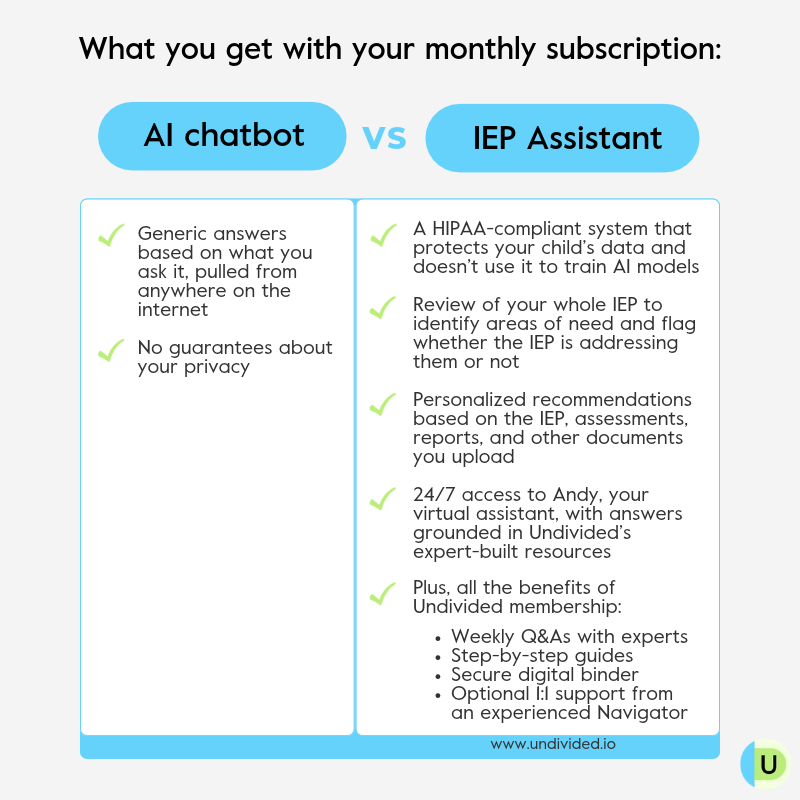
How is Undivided’s IEP Assistant different from other AI tools?
The IEP Assistant is built differently than generic tools. Learn more in this video:
How long does it take for the IEP Assistant to analyze my IEP?
Shorter IEPs can be processed in one or two minutes. Longer, complex IEPs can take up to ten or twelve minutes. Once you upload your document, Undivided will send you an alert and an email when it's done processing. If your upload takes more than fifteen minutes, there may have been an extraction error; the Undivided team will be notified and take a look at the issue.
How do I use the IEP Assistant to review goals?
IEP Assistant is your workspace as a parent to collect your thoughts around your IEP, both the whole document and individual pieces. When you look at a goal, you can view the baseline (if it’s written in the IEP). You can look at the present levels of performance that are related to the goal, and you can look at any short-term objectives of the goal. If you click through each goal, you’ll see recommendations based on the structure of the goal or how it's written. What we call the “excruciating detail” gives much more detail about why this is important and how you might ask for additional supports. You can add the recommendation as a note, or you can create your own note from scratch. You can also dismiss a recommendation and move to the next goal, and then go through each of the goals one by one.
How do I use the IEP Assistant to review services, accommodations, or modifications?
In the same way you can review goals and recommendations, you can choose to add the recommendation as a note or add your own note from scratch. You might see recommendations about the balance between push-in and pull-out services, confirming locations for accommodations, or adding the missing accommodations that IEP Assistant found referenced in goals that were not in the accommodation list.
How does the IEP Assistant know what to recommend?
Our system starts with the extraction process so that we can really understand all of the elements of your IEP. We've written hundreds and hundreds of prompts, which sit behind the scenes, that take aspects of your IEP, assessments, and any other supporting documents you upload and compare them. We've also written a whole bunch of resources that allow us to match certain areas where your child may need support to specific accommodations, services, and goals. All of that is educated by our team of advocates and the work that we've done with parents, so we can keep high-quality, vetted information in one spot. It's going to continue to be trained on our thousands of pieces of content about different diagnoses and different support needs that we have interviewed experts for, so it's all informed by content that we trust.
Our tool is meant to give you new ideas and give you new ways of talking about different supports, accommodations, and services that you could request. Our recommendation might not be 100% what you need, but it's probably pretty close, so you can take that and tweak it based on the additional context that you know about your child.
If the recommendations sound off, that may be because there's elements of your IEP that are off, so it can be an important flag if we're missing a significant area where your child needs support. That may be a red flag that the need is not properly documented in your IEP.
How does the IEP Assistant help with IEP prep?
IEP Assistant will help you create your notes and lay everything out in a nice, clean format with a summary write-up of the IEP and the general notes that you want to discuss with your team. The idea is to take all these recommendations for you as a parent to really think about. We're not saying what's best for your child, but we're trying to inspire you to think, “Is this something I want to talk to my team about? Is this something that could be improved for my child along the way?” Then, when it comes time to prepare for your meeting or discuss concerns with the team, you can go ahead and print your notes or save as a PDF.
In the new excruciating detail section, we carefully outline how you ask for this exactly, including the background and the context and all that information. So as you're going through that process with the team, you have access to where that info came from and how to work through that process with the team. The IEP is a deep, dense document, sometimes 40-60 pages long. It's almost impossible to go through all of that by hand and then keep it all in your head. We want to give parents a more digestible way to go through your IEP in one spot. We show you PLOPs, services, accommodations, modifications, goals, all of that info in one place.
What if I get a new IEP document?
At any point, if you get a new draft or an amendment, you can add a new IEP. Once you upload a new document, the system will process it, extract all the information out of it, and run you through that same system. You don’t have to delete a previously uploaded document before you can add a new one. Click “View Previous IEPs” to see past documents.
Can the IEP Assistant compare an old IEP and a new one?
Right now, the answer is no; that is something that we're working on. Over time, what we want to do is take an IEP from last year, take this year's IEP, and compare the differences between those IEPs. We’ll look at the present levels of performance in each, and see whether progress is being made, whether the same goals are being recycled from last year, etc. That's something that we are working very diligently on.
Can I upload a document besides an IEP, like a progress report, assessment, or evaluation?
Yes, in our latest update, you can add supporting assessments, private evaluations, reports, and anything that describes where your child may need some support in school. The reason is because there's a whole bunch of information that would describe our child that isn't in the IEP. We want to make sure that we are educating ourselves on the entirety of their needs before we make those recommendations of what we think could change and what could be added.
We're working on the process of uploading a progress report, matching it to the IEP that's been uploaded, and then digging into whether progress has been made in that particular area or not, and even work toward recommending what may be appropriate goals going forward based on that progress.
Does the IEP Assistant work for triennial IEPs?
The process works the same way whether it's an annual or triennial IEP document.
Once I’ve dismissed a recommendation, can I go back to review it?
Yes, this is a new update. If you dismiss something by mistake or you want to come back later and look at it, it's all going to be there.
How do I use the IEP Assistant for two kids with different IEP documents?
Switch between your two children’s Roadmaps, and you’ll be able to work on the “Prepare for my annual IEP” goal and upload your documents for each child separately. The important thing is to create another kid in our system so that we can keep those two distinct when we make recommendations.
Can the IEP Assistant tell me how to get a specific placement in the IEP?
Not yet. What we are doing is flagging and making recommendations along the way of where inclusion can be improved. We have our assistant Andy, which sits behind the scenes in all of this and is always available for parents to chat with, and that's something that Andy has the same logic and the same information behind it that builds out those recommendations. We're working on a number of different ways that parents could ask those very specific questions, like “I have concerns about inclusion. How would I ask for this?” and we can put those into the IEP Assistant.
Can the IEP Assistant write new IEP goals for me?
Not currently. How the system is designed is we make recommendations on goals based on a goal in your IEP, but it can be written in a way that either makes it easier for the school to follow, easier for you as a parent to keep the school accountable, or easier for you as a parent to understand if progress is really being made.
Moving forward, we’re working on optional features in Andy AI for parents to brainstorm IEP goals. Andy AI will be able to interview you as a parent to understand where your child's support needs may be so that we can push that information into the IEP process. We’re also working on incorporating a number of different templates for communication with the school and requesting different services through your IEP. We're working on building that capability into Andy, so there'll be a whole bunch of new enhancements coming out that we will let everyone know about.
What if I get pushback from the school about what the IEP Assistant recommends?
The “excruciating detail” in a recommendation gives the why and what to say if a school pushes back. If that information isn't enough, it's a great use case for Andy. It's also a great use case for speaking with one of our Navigators and trying to get some techniques and ideas of how to kind of bring the team along with you. One of the things that we're working on putting into Andy and into the IEP Assistant is “Help me understand,” which is a great way to get the school team and others to explain their position, which, if they can't, helps to move that roadblock potentially out of the way.
Can an Undivided Navigator help me with the IEP Assistant and IEP prep?
Certainly. Our Navigators are incredible. They are not IEP advocates, but they support parents in understanding what's in their IEP, forming strategies as a trusted partner, and as an extremely experienced parent who has gone through this process for themselves and their own kids, and then hundreds of other families. If it's something that they don't understand or don't have the tricks themselves, the beauty of our Navigator team is they have access to our experts and advocates. They take your questions, your challenges, and what you're working with, and they put it out to our broader team.
Can I use the IEP Assistant for a 504 plan?
Yes, we have a version specifically tailored for 504s.
How are the IEP Assistant and Andy different?
The IEP Assistant and Andy are effectively a very similar engine that sits behind the scenes. The IEP Assistant makes the IEP really digestible and more easily understood. If you're texting back and forth with a really experienced friend or an IEP advocate, that's not as helpful as sitting down in front of a whiteboard with that friend and drawing pictures, right? That's why bringing that into a customized user interface is really valuable. Andy understands all of the same practices, information, and techniques, but parents can interact with Andy in a chat interface.
Do I still need an education advocate?
Undivided’s IEP Assistant uses what’s written in your child’s IEP document to make some recommendations and help you think about what you can ask your IEP team and what you should be looking at in your IEP. This tool is not a replacement for advocates, nor is it a replacement for you going through your child's IEP and really working hand in hand with your child's IEP team. It does not replace your team's judgment or your judgment as a parent. You as a parent and advocates you may be working with know a lot more context than what is contained within the IEP document.
Is IEP Assistant available in another language?
IEP Assistant is only available in English at this time. There are a number of things in our app that we're working on getting language translations for in the future.
Is the IEP Assistant available in every state?
Yes, you should be able to use the system in any state. We are nationwide. What sits behind the IEP Assistant is individual Ed Code information from all 50 states. As you use this system, if you're willing, please give us detailed feedback! The more feedback you give, the better this system will get, not just for you but every other family across the country.
Does the IEP Assistant work on my phone or only on a computer?
On the Undivided mobile app for iPhone, you can upload your IEP. The same process will run, and you have access to that same IEP Assistant right on your phone. There are some nice features of swiping recommendations left or right that help you go through it wherever you are on the go.
How do I report a bug or provide feedback about IEP Assistant?
If you’re working with a Navigator, you can let your Navigator know your feedback to pass on to our IEP Assistant development team. Part of the beauty of what we do as a company is that our Navigators are often our internal testers, so if you are working with a Navigator, please keep them up to date on what features, information, and systems would be helpful. What we prioritize and work on directly comes from parents working with Navigators.
You can also email support@undivided.io.
In the future, we'll be adding a number of different ways that you can give us feedback directly in the system.
Get started with IEP Assistant
Prepare for my annual Individualized Education Program (IEP) meeting
IEP Assistant is continually undergoing adjustments from our team as we continue to get feedback from parents, so if you have any issues, questions, concerns, or feedback for improvement, please reach out and let us know!


Unlock more with Undivided
Turn knowledge into action that benefits your child
Get Membership


Author