

Eye Gaze 101
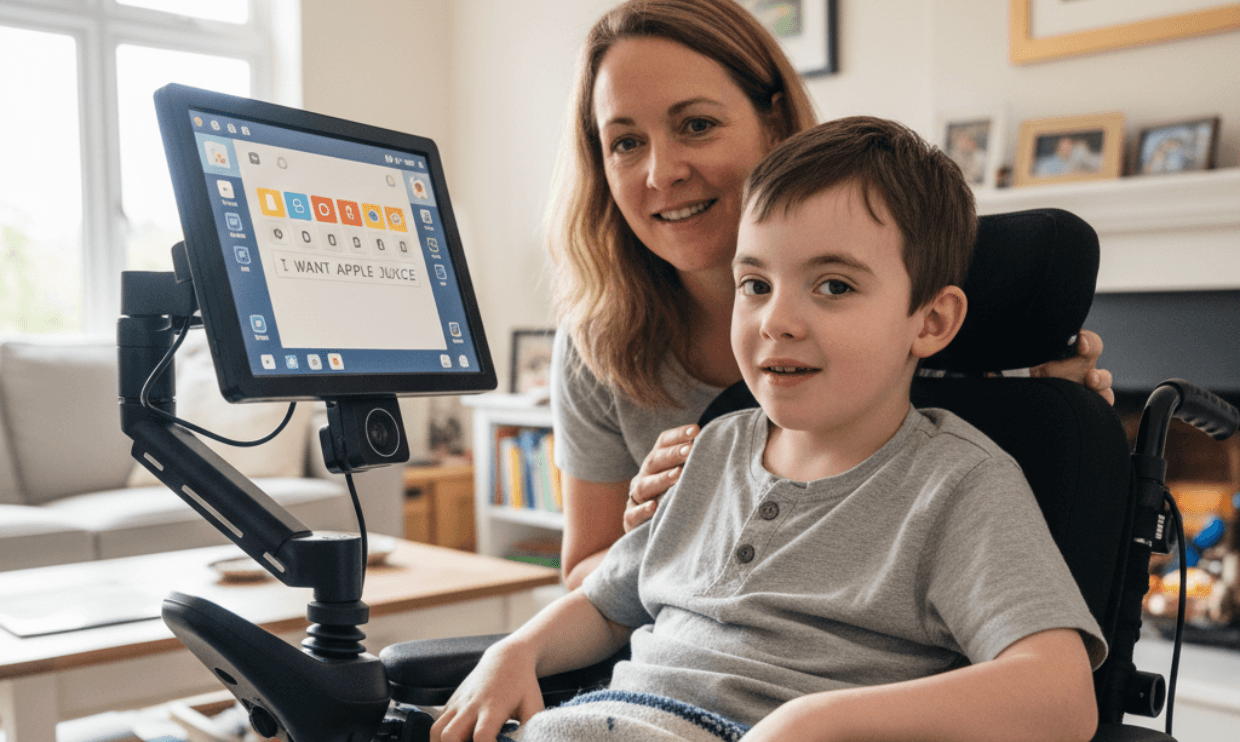
Eye gaze is a form of AAC (augmentative and alternative communication) that allows a person to control or provide input to a computer (or a tablet) using only their eyes. Think of it like controlling a computer mouse with your eyes, as a small camera tracks where the eyes are looking and turns that into a “click” or selection.
This type of communication often comes with a steep learning curve, as there are dozens of different eye gaze programs, input methods, and more that can make it difficult for parents and children to learn. To help us walk through everything eye gaze, we spoke with Co-Founder and Consultant of The Babel Group, Katie Seaver, MS, CCC-SLP; Clinical Consultant at The Babel Group, Jill Adlin, CCC-SLP; and Speech-Language Pathologist and Owner of Trivinity Consulting, Bernadette Kennard, MA, CCC; and Undivided Director of Health Plan Advocacy, Leslie Lobel.
What is eye gaze technology?
High-tech eye gaze is a type of technology that shines infrared light toward a child’s eyes. A small camera then captures how that light is reflected back, allowing the system to track where the child is looking.
The infrared lights and camera work together to track where a child’s eyes focus, blink, or dwell on specific areas of the screen. From there, a specialized software then pinpoints where the child’s eyes are looking and interprets it into some type of command. These commands can generate speech, access computers, and control certain devices in the home.
Kennard dives deeper into how this technology works in this video clip.
Who is eye gaze for and what are the benefits?
Eye gaze technology can be great for individuals with limited ability to make hand or head movements, such as those with cerebral palsy, but it is not limited to any one diagnosis. During an assessment for eye gaze (which we’ll dive deeper into later), Kennard shares that a child’s speech language pathologist (SLP) will take multiple factors into account: how the child’s body moves consistently, what communication methods they’ve used in the past, and how they respond to different access options. From there, the SLP will determine whether eye gaze is the appropriate communication method for the child’s needs.
The overall goal with eye gaze is not only for your child to communicate, but also to find and form a genuine sense of connection and freedom. As Seaver puts it, “When it comes to an eye gaze device, it’s very exciting, and it’s a rewarding experience to find the potential communication that might not have been unlocked in previous strategies.” Unlocking communication is the key to unlocking connection, but this process requires both time and patience from you and your child as they learn a whole new way to communicate and connect. For families that have found success with eye gaze, it has often opened doors for children to share ideas, build relationships, and fully participate at home, at school, and in the community.
Types of eye gaze systems
There are so many eye gaze systems out on the market, and an SLP’s job is to know what system will work best for your child. That’s not to say, however, that you should not do your research before selecting the type of system. Not only do you want to better understand how your child will be communicating, but you also want to keep an ear to the ground for anything new that comes out in the eye gaze world. In our technologically advanced world, this can happen almost yearly.
To give you a good jumping-off point, we’ve compiled a list of eye gaze systems on the market.
High-tech eye gaze systems
High-tech eye gaze systems are specially designed tablets (different from a standard iPad or Android) that work with a camera built to specifically track eye movement consistently and accurately.
- PRC’s Look® Eye Tracking Module (Windows-based device) that can be paired with their AAC devices (Accent, NovaChat, and Via product lines)
- Works with glasses and contacts
- Has a large track box that allows for natural head movement and flexible positioning
- Can follow when your gaze shifts quickly
- Features adjustable cursor speed, dwell time, and calibration to match
- Offers full Windows navigation (access to the internet)
- Price: $6,000+
- Tobii Dynavox I-Series (Windows-based device with TD Snap or Communicator software)
- Purposely built for people with conditions such as cerebral palsy, Rett syndrome, or ALS/motor neuron disease (MND)
- Offers multiple access methods
- Features outdoor eye tracking
- Has powerful speakers
- Price: $11,000+
- Eyegaze Edge® (Windows-based device)
- Allows the user to generate speech by typing a message or selecting pre-programmed phrases
- Allows calling and texting when integrated with a cellular device
- Can control entertainment and sound systems, lights, and switches with infrared
- Can access the web and send and receive emails and pictures
- Offers a low-light camera that minimizes fatigue and accommodates droopy eyelids.
- Price: $8,000±
It’s important to note that most eye gaze systems do not come with wheelchair mounts, desk or floor stands, protective cases, switches, travel cases, battery packs, etc. The products will most likely have to be purchased in addition to the system.
Eye gaze apps
Eye gaze has recently become available on tablets but can be less reliable when used on tablets than when used on a dedicated device. The success of the software often depends on the quality of the tablet’s camera. Below are a few apps or settings you can access on your digital devices.
- Apple Eye Tracking for iOS 18 (iPad and iPhone)
- VersaEye app with PRC-Saltillo
- TD Pilot (eye gaze iPad system by Tobii Dynavox)
- An iPad-based system with built-in eye tracking. More portable than the I-Series.
Low-tech eye gaze systems
There are low-tech versions of eye gaze that use little to no technology. “Most often, you’ll have an opening in the middle [sort of like a picture frame], that’s going to let the clinician see the face of the communicator, and then they are going to watch where the eyes go to help them locate which item on the low-tech board they want to say,” Adlin tells us. These items could be letters, symbols, or actions that a child is looking at, but instead of a camera following your child’s eyes, it’s a clinician instead. The clinician can interpret what the person is trying to say based on where they are looking.
Below are a few low-tech eye gaze options:
- There are templates available online that you can print to create a low-tech eye gaze board.
- LessonPix Eye Gaze Frames
- Free
- Teachers Pay Teachers Eye Gaze Boards
- $3.00+
- Low Tech Solutions Communication Boards
- $23-$109
- The MegaBee Eye Pointing Communication Tablet
- $1,760
Adlin explains that there’s no “right place” to start when it comes to using low-tech or high-tech eye gaze systems, just the best place that works for your child. Some children have found success starting with low-tech eye gaze technology and using it as a stepping stone, but in Adlin’s experience, she’s also seen the opposite. Ultimately, your child’s eye gaze journey is going to be completely their own! You’ll want to work with your SLP or occupational therapist and get their insights on what works best for your child.
Eye gaze input/access method
Eye gaze is not a “one size fits all” technology, and while the name for this form of communication may sound straightforward, there are different input methods (ways of accessing this technology) than just dwelling/focusing on a word or an action long enough on the screen.
As Adlin puts it, “We’ve got the computer and the software it’s running — but then the question becomes how do I access that software? With eye gaze, my eyes step in for the mouse. My eyes are the cursor moving around, and when I get to what I want, I click on it. The ‘click’ can be done with a blink, with a dwell — meaning staring for a short amount of time — or with a traditional switch.”
Your SLP will help to determine which input method is best for your child. “Clicks” and “dwells” are often best used for individuals with limited mobility or muscle control, since they rely on only using your child’s eyes. On the other hand, the traditional switch works in tandem with your child’s eyes dwelling on an area they want to select, which then “confirms” or “activates” that command with the press of a physical button — essentially left mouse clicking to confirm the selection. Following the selection, the words or action is then spoken aloud via speakers attached to the device.
In this video, Kennard dives deeper into traditional and nontraditional eye gaze input methods.
Steps to setting your child up for success with eye gaze technology
If you think your child can benefit from eye gaze, the first step is to connect with your child’s doctor, SLP, occupational therapist, or assistive technology specialist. The specialist will then conduct an assessment or recommend you to someone to determine whether eye gaze is the best fit.
It’s important to note that your funding source for this may also determine who conducts your child’s eye gaze assessment. If it’s your child’s school or private insurance, for example, they might have a particular specialist from whom they require you to get the assessment in order to get the device.
Step 1: the assessment
Every child is different, which is why a thorough evaluation conducted by a specialist is an important first step before exploring eye gaze technology. An eye gaze evaluation looks at more than just eye movement — it considers the whole child and how they can communicate best. According to our specialists, this is what evaluators are commonly looking for when conducting an evaluation for eye gaze:
- Muscle movement: is the child physically able to touch or raise their hand to touch a screen or switch?
- Muscle endurance: where is the child consistently the strongest? If it’s their eyes, then they may be a good candidate for eye gaze.
- Modes of input/access: would a switch, dwell, or blink be the best way to access this technology? Or does the child have enough controlled movement elsewhere that eye gaze may not be necessary? If a switch is used, where does the switch need to be mounted (by the head, arm, foot, etc.)?
- Device location: devices can be mounted anywhere to accommodate the user. Would the child need the device to be mounted for them lying down, sitting up, at a specific angle, etc?
- Cognitive function: where is the child cognitively, and how do they take in and understand information? This helps inform the team choosing vocabulary, layout, and complexity to meet your child where they are — while still supporting growth and learning over time.
- Eyesight: does your child have low vision? Do they have nystagmus (a condition in which an individual’s eyes shake rapidly back and forth). Eye gaze systems can still be used by individuals with nystagmus or those who wear glasses or contact lenses, but specialists need to find the brand of eye gaze that works best for the child.
In this video, Kennard dives even deeper into her assessment process.
The assessment also helps to determine where your child is to determine where to start with the level of eye gaze systems. For some, that could look like jumping right into high-tech; for others, it could be low-tech. Again, it will be different for each and every child. There is no “right place” to start.
Step 2: eye gaze system trials
Once it’s been determined that your child is a good candidate for eye gaze, the next step is finding what eye gaze systems work best (refer back to our list of systems above for reference). Your child’s eye gaze specialist (SLP, occupational therapist, or assistive technology specialist) will often work with your funding source (school, Regional Center, CCS, etc.) to arrange trial devices and access methods to be tested before selecting an eye gaze device.
Expert tip: make sure you take your time during this phase. Our experts have seen families rush into a selection without properly trialing a system, only to later find that it isn’t the right match for their child, and then they are unable to get a new device covered for a year or more.
Once you’ve identified which system or systems your child will trial, the specialist will help conduct trials with those eye gaze options. Most companies offer a free trial so families can see how an eye gaze system works for their child at home, in real-life settings.
Here are a few tips on what to look for during this trial period:
- How does the device or technology perform at different times throughout the day?
- At what times of the day is your child most successful?
- Does fatigue affect the accuracy of communication with the device?
- Is the system consistently responsive? Or is there ever any buffering or lagging?
- How well does the device work for your child inside and outside?
- Does inside lighting affect accuracy?
- How easy is it for you or a caregiver to set up the device or technology?
- How stable is the device when mounted?
- Is it easy to position the device differently if your child is lying down?
- Does the eye gaze input method feel reliable and comfortable?
- How long does the battery life hold up? Does the device come with a backup battery? How long does it take the battery to charge?
- Does the software seem to feel intuitive or difficult for your child?
- Does the company offer training?
Eye gaze calibration
Testing an eye gaze system’s calibration is another thing you and your team should keep in mind when running trials with various systems. Calibrating an eye gaze system, according to Adlin, means teaching the device how your child’s eyes move and where they move on the screen. The device learns your child’s eye movement by following the prompts to look at calibration points (dots on the screen) or pictures. The system then uses that information to know exactly where they’re looking at the screen.
For younger children and beginners, some systems use one-point calibration, meaning the buttons on the screen are much bigger so the child can select what they want. For seasoned eye gaze users, some systems offer sixteen calibration points, meaning there are more buttons on the screen for users to select from.
In this video, Adlin dives even deeper into eye gaze calibration.
Your eye gaze specialist should help you set up calibration on your eye gaze device and show you how to do it yourself in case you need to troubleshoot.
Ultimately, this trial period isn’t about seeing whether your child can use the system perfectly. It’s about gathering information — learning whether this system can work for your child and whether it feels more comfortable and accessible for them than other options do.
Step 3: funding eye gaze
You’ve found the right team to help your child start their eye gaze journey. You’ve spent the past few weeks — or even months — testing different eye gaze systems. And finally, you’ve found the one that works best for your child! Now you need to figure out how to fund it.
In some cases, eye gaze systems require prior authorization, meaning the device must be approved by insurance before it can be ordered. This process typically involves submitting documentation — such as a prescription, a letter of medical necessity, and evaluation notes — from your child’s care team. Understanding these requirements early can help you avoid delays and unexpected costs once you’ve found the right system. For example, if you’re planning to use private insurance, your plan might require that the assessment or device come from a specific in-network provider in order to be covered. Be sure to speak with your provider to avoid any unwanted costs!
Private insurance
Eye gaze systems are considered durable medical equipment (DME). This means they are in the same category of benefits as a walker or a wheelchair. According to Lobel, most private insurance programs cover DME. The key questions for families are how much of the eye gaze system will be covered and how that coverage interacts with their deductible.
If your child has private insurance, you’re usually better off working with an in-network provider for eye gaze or other DME. That’s because in-network providers:
- Are required to work directly with your insurance company
- Handle the authorization and billing process on your behalf
- Typically leave you responsible only for what remains after the deductible and coinsurance, rather than the full cost of the device
On the other hand, going out of network is usually not recommended. When you use an out-of-network provider:
- Coverage is often lower or more limited
- You may be asked to pay much more up front
Providers may not assist with insurance authorization, placing more responsibility on you
Understanding your insurance benefits early — including your deductible and whether it applies to DME — can help you avoid unexpected costs and delays later in the process.
It’s important to note that in some cases, insurance companies will not let you know in advance whether they’re going to cover DME. Instead, they might say that they will determine coverage at the point of the claim. If your insurance tells you this, make sure it is your provider that is sending the claim.
Medicaid
State Medicaid programs, such as Medi-Cal in California, are next in the order of funding operations. In other words, if private insurance doesn’t cover the device and your child has Medicaid, it can be used to help cover what your private insurance doesn’t pay.
However, Lobel warns that Medicaid usually requires its own medical documentation that is separate from that required by private insurance. In other words, even if your child has both private insurance and Medicaid, and even if the same doctor accepts both, Medicaid typically requires a separate, documented doctor visit and a letter. To be clear, this is not a note from your child’s SLP or their occupational therapist; this is a letter from a pediatrician. Though, Lobel does recommend still having your child’s speech-language pathologist write a note to share with the doctor to help catch them up with what your child’s needs for the device are and why.
As Lobel shares, in many cases, Medicaid is no longer satisfied with a simple letter stating, “This child needs an eye gaze device.” Instead, Medicaid often requires an actual doctor’s appointment — which, as most families know, can require a long wait. When scheduling this appointment, it’s important to clearly explain that the visit is intended to begin the authorization process for an eye gaze device.
At the appointment, the provider should write a detailed note that they saw your child and are formally recommending an eye gaze system. If you already know which eye gaze device and accessories you’re pursuing, it’s helpful to make sure the provider’s letter clearly states that as well, as this can prevent delays or confusion during the authorization process.
This documentation helps satisfy what the in-network DME provider needs in order to submit the request.
Other state disability programs
If your child receives services from a state disability agency, such as California's Regional Centers or California Children's Services, they could potentially help cover the cost of an eye gaze system after other funding sources have denied coverage for the device, paid partial coverage, or denied coverage for accessories. For instance, your insurance might cover only the base eye gaze unit and not any accessories needed for the device. You'll typically require medical documentation showing that eye gaze is necessary for your child, along with proof that other funding sources have been tried first.
Step 4: Implementing eye gaze
Congrats! If you’ve reached this point, the eye gaze device has been ordered or is now in your hands. Now what?
Well, according to our experts, your child’s assistive technology specialist (SLP, occupational therapist, etc.) will be there to help set your child up for success when it comes to their eye gaze journey. As Seaver mentions, eye gaze is not a “plug and go” scenario. This form of communication requires consistent training for not only your child but also your family to be able to understand how to use the device.
Eye gaze and fatigue
A common myth about eye gaze is that it’s just someone looking at a screen, but it is so much more than that. Adlin puts it best, saying, “[For most people] you have no problem holding your pen. You know how to form letters. You know how to put those letters into words. You know how to put those words together to form very complex thoughts. But if you had to write your answers all day long to everybody with no physical or cognitive issues whatsoever, it would be agonizing. It would be so slow, you would be so fatigued, and you would be left out of so many conversations.”
Eye gaze is a great communication tool for those who have mastered it, but (as we’ve said repeatedly) it takes practice and patience. Like building strength through exercise, learning eye gaze requires stamina that develops gradually over time.
Breaking this down even further, eye gaze users often have to know what they’re going to say before they even look at the screen. Then, once they know what they want to say, they must find the commands or words on the screen they want to activate. For people who don’t use eye gaze, it’s almost like having to plan out an entire sentence in your head before you’re able to say it.
Your understanding of eye gaze might have been shaped by what you’ve seen in the media — where eye gaze users seem to communicate instantly, almost like a stream of consciousness. But as Seaver explains, most eye gaze users actually communicate at about eight words per minute, compared to the average 140 words per minute for non–eye gaze users. And reaching eight words per minute takes time, often a year or more with a professional who knows how to build up your child’s eye muscle stamina and meet them where they are cognitively, all while making it feel exciting to keep them motivated to want to use the device.
Seaver shares more about what eye gaze looks like in real life compared to how it is portrayed in the media.
Tips for parents
Adlin shares that when she begins introducing and teaching a child how to use eye gaze, she focuses on creating “errorless play.” This means allowing the child to explore the device freely, without being told they’ve done something wrong.
“If you got a brand-new phone and took it out,” Adlin explains with a laugh, “and I was saying, ‘Hey, wait — no, here, push here, touch there. Do that. Oh, you’re doing it wrong — nope, nope, nope. Do this,’ that would be really overwhelming. They just need space to explore.”
We know that as parents, we just want our children to succeed and are eager for them to access communication in a way they never have before, but it’s important to be patient with your child. The last thing you want is your child feeling pressured to do something right and then winding up not wanting to use their eye gaze system at all."
To help set your child up for success when it comes to eye gaze, we’ve compiled a list of some great tips our experts have shared.
- Give them time alone to play with the device
This exploratory play can help them to feel more independent and confident with their skills.
- Put yourself in their shoes
The number one thing our experts recommend is to have parents try and use their child’s eye gaze system to understand just how difficult it can be. This can create a deeper sense of understanding and empathy for your child when they may be struggling (or succeeding) with this new technology. In this video, Adlin shares more on why trying eye gaze is important.
- Practice in increments
Don’t expect your child to use their device 24/7, especially, when they are just starting out. You want to slowly introduce the device into your child’s routine to build up their stamina to use it more throughout the day.
- Try to separate learning access from learning language
Learning how to use eye gaze (access) and learning what to say (language) are two big tasks — and trying to do both at once can be overwhelming. Don’t feel frustrated if your child is successful in one area but is still working on the other.
- Watch and listen to your child’s cues, not just the screen
As you most likely know, eye gaze is just one part of communication. Long before your child had access to eye gaze, you were likely able to understand what they wanted or how they felt through their facial expressions, body language, or vocalizations. Don’t forget to still focus on those same communication methods along with the eye gaze technology.
- Try out some different voices
A fun way to make your child’s eye gaze device more engaging is to download a voice that sounds energetic and fun. This is often better than the stereotypical flat and robotic-sounding voice that the systems come with. Adlin recommends checking out Voice Smileys from Acapela Group, which has a range of bright and bubbly to deep and bassy voices with proper inflection on certain words. In this video, Adlin shares her experience with Voice Smileys.
- Our last tip: be kind and patient with yourself
Many of our experts share how they’ve witnessed parents absolutely gutted when their child is struggling with their eye gaze system. They feel that somehow, their child’s struggle is a reflection of the parent not doing enough.
This, of course, could not be further from the truth. Adlin puts it best, saying,
“Parents often beat themselves up, thinking they’re doing something wrong. But they’re firing on all cylinders — trying everything they can to support their child — and they’re focused on this big communication goal down the road: I want my child to use sentences. I want to know what happened at school. I want to know they’re safe. And those hopes are completely valid.
But what often gets missed is everything parents are already doing. You’ve charged the device. You’ve positioned it. You’re making it available. You’re smiling when your child uses it. Those are huge steps! Parents tend to skip right past all of that and give themselves no credit.
When I walk into a home, I often think, ‘Wow — look at the ten things you’re already doing right.’ So much of this comes down to keeping things authentic, engaging, and fun, without pressure. That’s what really matters.”
At the end of the day, you’re doing the very best you can for your child — even if that little voice in your head is telling you otherwise. You’ve advocated for your child and helped give them access to a form of communication that can open so many doors. We’re not here to tell you how to feel, but we are here to invite you to pause for a moment and look back at everything you’ve already done. Those small wins matter more than you may realize — and together, they add up to big wins.
If you’re looking for some more help along the way for your child with a disability, you can try two free sessions with a Navigator today when you sign up!


Unlock more with Undivided
Turn knowledge into action that benefits your child
Get Membership


Author